

Live refresh and debug
One small localhost link between Patterpad and your running game buys you two things.
Live refresh means you save in the editor and the running game picks up the edit without restarting. Reword a line and the game speaks the new words the next time it comes up; even restructured scenes carry the run across.
Live debug means the game streams its story cursor back, and Patterpad follows it like a debugger. The current beat highlights, scenes switch as play crosses them, and you can see which flow is where.
The debug half is observe-only, so the game stays in control and the editor is a passive mirror.
The link is a loopback-only WebSocket (127.0.0.1), so only processes on your own machine
can reach it, and nothing leaves your machine. Web pages are refused too, unless they are served from
your own machine (localhost), so a site open in your browser cannot connect and read your story.
Every engine ships a client (JavaScript, Unity, Unreal, Godot), all speaking the same
patterplay/debug@1protocol below. Each is a debug-only tool, inert in a shipping build and safe to leave wired in (see the per-engine notes).
Turn it on in Patterpad
Section titled “Turn it on in Patterpad”The link is controlled by a small connect icon in the bottom-right corner of the editor (and by the Play ▸ Live Link menu item, which is ticked while the link is on).
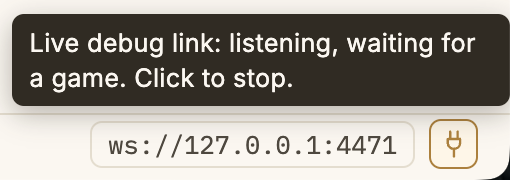
ws://127.0.0.1:4471 sits beside it (click to copy); hovering spells out the state.- Click the connect icon (or tick Play ▸ Live Link). It turns amber (listening) and
the address (
ws://127.0.0.1:4471) appears beside it. Click the address to copy it. - Run your game with its link client pointed at that address (below). When it connects the icon turns green and the editor starts following the cursor.
- Click the icon again (or untick the menu item) to stop.
The icon’s colour is the state, and hovering it spells the status out:
- Grey is off.
- Amber is listening, waiting for a game.
- Green is connected and in sync, so the game is running this exact build and beats highlight precisely.
- Red is connected, but running a different build.
Red means you’ve rebuilt or edited since the game launched, so beat ids may not line up. The editor still follows scenes, but rebuild and relaunch to re-sync for exact-beat highlighting. A game wired for live bundle refresh re-syncs itself, since saving in Patterpad pushes the new bundle straight into the running game.
If more than one flow is live, a small flow picker appears next to the address to choose which one the playhead tracks.
Live bundle refresh
Section titled “Live bundle refresh”With the link connected, Patterpad doesn’t just watch your game. Saving in the editor pushes the freshly compiled bundle into the running game, which picks it up without restarting. Reword a line, hit save, and the running game speaks the new words the next time that line comes up. For a writer, this closes the loop completely. Play your actual game, feel a line land wrong, fix it, and hear the fix on the next pass, with no rebuild, no restart, and no losing your place.
Two tiers, picked automatically:
- Text-only edits swap the string tables in place. Nothing restarts and no state is touched.
- Structural edits carry the whole run across (a save and load behind the scenes). Position is re-found by id, so lines inserted or reordered before the cursor neither replay nor shift where you are; an option you deleted drops out of an open choice; content deleted under the cursor is skipped and play continues from the nearest survivor.
JavaScript wiring, via applyLiveBundle (a one-time developer task; writers just save):
import { createDebugLink, applyLiveBundle } from "@patterkit/play-helpers";
let engine = new Engine(BUNDLE);let bundle = BUNDLE;let flow = engine.openFlow("main");
const link = createDebugLink({  build: engine.buildId,  onBundle: ({ build, data }) => {    const r = applyLiveBundle(engine, bundle, data); // picks the tier itself    engine = r.engine; bundle = r.bundle;    if (r.kind === "structure") flow = engine.getFlow("main"); // re-bind your flow handles    link.setBuild(build);                            // the editor's pill flips back to in-sync  },});
Every engine receives the push. The native wiring mirrors the JavaScript shape, adapted to each engine’s threading.
In Unity, drain the link from your Update() (the socket runs on a worker thread), then apply
if (_link.TryReceive(out var raw) && PatterLiveBundle.TryParsePush(raw, out var build, out var data)) { var r = PatterLiveBundle.ApplyLiveBundle(_engine, _bundle, data); … _link.SetBuild(build); }.
In Unreal, set Link->OnBundle, which fires on the game thread. Load with
UPatterBundle::LoadFromString(Data), apply with Engine->ApplyLiveBundle(NewBundle) (the engine
object and every UPatterFlow handle swap in place and stay valid), then Link->SetBuild(Build).
In Godot, connect the link’s bundle_pushed(build, data) signal. Apply with
engine.apply_live_bundle(data) (re-bind flow handles on a "structure" result), then
link.set_build(build).
The same swap powers Patterpad’s own Play window. Edit mid-run and it applies live (a quiet “Edits applied live” note), only falling back to the restart prompt when the in-flight edit doesn’t compile. The cross-bundle behaviour is locked by the shared conformance corpus, so all four engines resolve an edit under the cursor identically.
There are honest limits. Your game’s own side-effects don’t rewind (things already spawned stay spawned); text already in a transcript keeps the words the player saw; and an edit that changes how many random draws happen before the cursor naturally changes later draws.
Wire in the debug half: follow the cursor
Section titled “Wire in the debug half: follow the cursor”Every engine’s client has the same shape: open it with the build id, tell it when a flow opens,
report the position after each advance() / choose(), and tell it when a flow closes. It never
throws into your game loop, and if Patterpad isn’t listening every call is a no-op.
JavaScript: @patterkit/play-helpers ships createDebugLink:
import { createDebugLink } from "@patterkit/play-helpers";
const link = createDebugLink({  build: engine.buildId,            // the build identity: your compiled bundle's content hash  project: "My Game",               // shown in the editor's debug-link tooltip (optional)  // url: "ws://127.0.0.1:4471",    // the default; override if you changed the port});
link.flowOpened("main");            // optional: lists the flow before its first step
// ...in your play loop, after each step:const step = flow.advance();link.observe("main", flow.currentScene, step.id ?? null, step.type);
link.flowClosed("main");            // ...and when the flow ends
observe is the only call you must make. It carries the flow’s id, so a flow the link has not
seen announces itself on its first step: forgetting flowOpened costs you the flow’s row in the
follow list until it moves, not for the whole session. flowOpened is still worth calling for a flow
that exists before it says anything, and flowClosed still matters, since nothing else tells the
editor a flow has finished.
Unity. new PatterDebugLink(...). Wire it behind #if UNITY_EDITOR || DEVELOPMENT_BUILD so it
is stripped from a release player build:
#if UNITY_EDITOR || DEVELOPMENT_BUILD_link = new PatterDebugLink(engine.BuildId, "My Game");_link.FlowOpened("main");// ...after each step:_link.Observe("main", flow.CurrentScene, step.Id, PatterDebugLink.TypeName(step.Type));#endifUnreal. FPatterDebugLink::Create(...). It compiles to no-ops in a Shipping build (the
WebSockets dependency is dropped there), so it is safe to leave in:
Link = FPatterDebugLink::Create(Engine->BuildId(), TEXT("My Game"));Link->FlowOpened(TEXT("main"));// ...after each step (map EPatterStepType -> "line" / "text" / "gameEvent" / "choice" / "end"):Link->Observe(TEXT("main"), Flow->CurrentScene(), Step.Id, StepTypeName(Step.Type));Godot. A PatterDebugLink node. It only opens the link in a debug build
(OS.is_debug_build()), so it is inert in a release export:
var link := PatterDebugLink.new(engine.build_id(), "My Game")add_child(link)link.flow_opened("main")# ...after each step:link.observe("main", flow.current_scene(), step.get("id", ""), step["type"])Each link also says what it is doing, which matters because from inside a running game “the editor
isn’t listening” and “I never attached” look the same: its state (connecting, connected, or
closed), the build it handshook with, and the address it dials. That’s link.state, link.build,
and link.url in JavaScript, State, Build, and Url in Unity, State(), Build(), and Url() in
Unreal, and state(), build(), and url() in Godot.
That’s the whole integration on any engine. Leave the client wired behind your engine’s debug flag and it costs nothing in a shipped game.
The wire protocol (patterplay/debug@1)
Section titled “The wire protocol (patterplay/debug@1)”For native ports or a custom client, the protocol is one small JSON object per message over the WebSocket:
{ "t": "hello", "v": 1, "build": "<bundle hash>", "project": "My Game", "flows": ["main"] }{ "t": "frame", "flow": "main", "sceneId": "<scene id>", "beatId": "<beat id|null>", "type": "line|text|gameEvent|choice|end" }{ "t": "flowOpen", "flow": "main" }{ "t": "flowClose", "flow": "main" }One message travels the OTHER way, editor to game (live bundle refresh, above):
{ "t": "bundle", "v": 1, "build": "<new bundle hash>", "data": "<the full .patterc JSON>" }Send hello first; the editor reads the build + flow list from it before honouring any frames. The
ids are the bundle’s opaque model ids: the same ones every runtime already exposes on its step
result and currentScene. The server binds to 127.0.0.1 only, so no pairing token is needed. It refuses a connection whose
Origin header names any host but localhost, 127.0.0.1 or ::1; a native client sends no Origin,
or (Unreal) the loopback address, and both are let in.
Open source under the MIT licence, made by Ian Thomas.