

Coverage testing
Playing walks one route at a time. Coverage testing walks thousands: it runs your story through automatically, picking a random option at each choice, and counts how often every beat is reached. It’s the fast way to answer “does anything ever actually get here?” and to catch dead content before a player does.
Running the test
Section titled “Running the test”Review ▸ Coverage Test… (Shift+Cmd+C) opens a window that stays open while you edit, so you can act
on what it finds. Up top: Runs, Max steps, Seed (the same seed replays the same
run, for repeatable checks), and a Start scene. Press Run test for a table of every
line, narration, and game event beat, showing how often each one came up.
The story needs a start point for the test (and for Play ▸ Play from Start); if you haven’t set one, you’ll be asked to pick a scene, saved to Project Settings ▸ General ▸ Start.
Click any row to jump the editor straight to that beat. The window can pin itself on top (on by default) and keeps your last results for the session.
Reading the results
Section titled “Reading the results”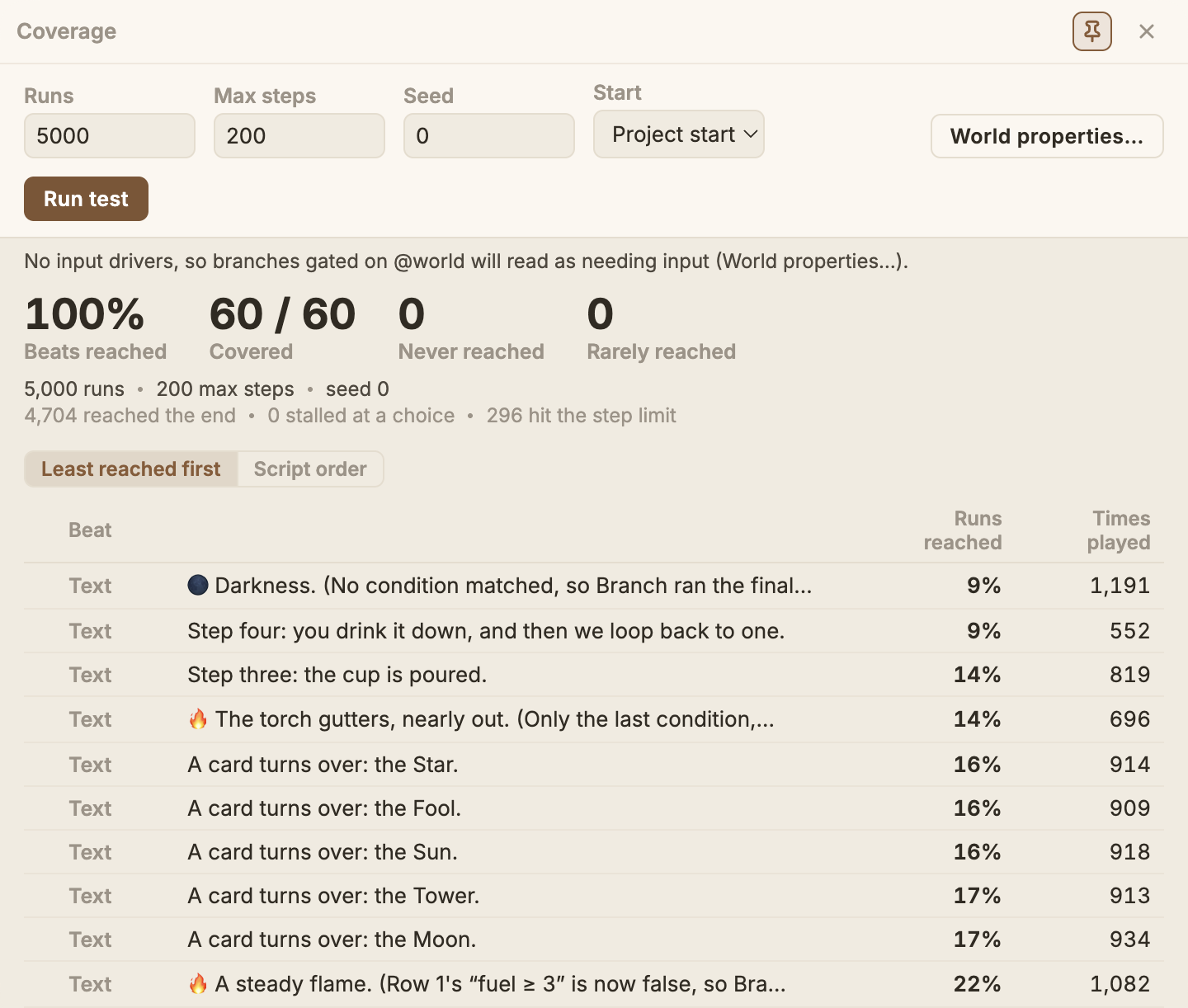
The four numbers at the top. Beats reached is the share of all your beats that played at least once, and Covered is the same as a count. Never reached counts the beats no run ever played, and Rarely reached the beats that did play, but in fewer than 5% of runs.
How the runs ended. Under the numbers, one line says how many runs reached the end, how many stalled at a choice with nothing to pick, and how many hit the step limit (still going at Max steps, usually because the test kept wandering round a hub the player can return to). Runs that hit the step limit aren’t a fault in themselves; a story with a loop always has some.
The table. Each row is one beat: its kind, who says it, and the start of the line. Two numbers follow:
- Runs reached is the share of runs that played the beat at least once.
- Times played is how often it played across all the runs together. It can be more than the number of runs, because a beat can play again in the same run, like a hub’s “back where we started” line.
Least reached first, or script order. The table opens least reached first: the beats that never came up at the top, then the rarest, down to the ones every run plays. That puts the rows worth a look where you see them first. Switch to Script order for every beat in the order the script runs, scene by scene. The window remembers which you picked.
The test chooses at random, so how often a beat comes up isn’t how often a player will see it: real players choose on purpose. Read the numbers as “can this happen, and how easily”, not as a forecast.
What it flags
Section titled “What it flags”Beats that never come up are flagged two ways.
A beat marked ‼ (dead) is one nothing ever reaches. Usually that’s a branch that can’t be taken, or a condition that’s never true.
A beat marked ? (needs input) turns on a value your game owns (@world.*) that nothing in the
story sets, so the test can’t reach it on its own. The row reads gated on @x; click that name to
see everywhere @x is used. Add a driver and the test can reach it.
A beat marked ? (dead at one remove) is gated on a value your story does set, but only on a
beat that never played either. The row names the gate and the beat that would have to happen first,
so two mysteries become one. Open that beat and ask why it never came up. A gate on a single flag
is named as the flag (@world.mood:armed), not the whole property, because a property half the
story writes always looks well fed. The gate can also be on the way in: when every jump into the
beat’s block passes a condition, that condition gates the beat too, and the row says gated on @x
on the way in, so the place to look is the jump. A writer with no line of its own (a scene’s
entry, a snippet that only jumps) is named by its scene or node.
That last one is deliberately cautious. Where the test can’t be sure a writer never ran (the property is assigned wholesale rather than a flag at a time), it says nothing at all rather than guess. A wrong “this can never happen” is worse than silence.
Rarely reached
Section titled “Rarely reached”A beat tagged Rare did play, but in fewer than 5% of runs. It can happen, just not easily: usually it sits behind an unlikely run of choices, or a condition that’s nearly always false. That can be exactly what you meant, like one card of many drawn at random, or a secret. It’s worth a look when it isn’t: a line most players should see that hides behind a condition you thought was common.
Choices that ran dry
Section titled “Choices that ran dry”If a choice ever ends up with nothing the player can take and no fallback, it silently steps past itself at runtime rather than dead-ending the game. That is easy to author by accident, so the test also flags any choice it actually saw run dry, with the run count and a click-through to the choice. Give such a choice a fallback option, or one unconditional option, to guarantee the player a way through. (Patterpad also warns about this statically, in the Problems panel.)
Conditions and effects that failed
Section titled “Conditions and effects that failed”A condition or effect can fail while the story plays, in ways Patterpad can’t see while you write: a
division by zero, a game value of an unexpected type, or the story setting a @world value your game
marks read-only. The engine never stops for one. A failing condition counts as false, so its line or
option is skipped, and a failing effect is skipped while the rest of its list still runs. Because
nothing stops, the test lists each failure it saw, with what failed, the scene, the error, and the
number of runs it happened in; click one to jump to it. The Play window marks the same failures in
its transcript as you play.
World Properties and coverage drivers
Section titled “World Properties and coverage drivers”Some branches turn on values your game owns rather than the story, written as @world.name
and declared up front in Project Settings ▸ World Properties. Declaring them is part of
setting up the project; what
matters here is that a declared @world value gives the test a default to fall back on, and
a place to hang a driver.
Where the game shares its scopes,
the test also stands in the other editing tools’ scopes a line names, such as the Storylet
Engine’s @story, from the defaults their files declare, so a story that reads them runs rather
than being refused.
Coverage drivers
Section titled “Coverage drivers”Since your game sets these while it runs, the coverage test can’t know them, so a branch that
turns on @world.alarm reads as needs input. To exercise it, add a coverage driver in the
same tab: name a @world value and give the test a pool to draw from (once at the start, or
re-rolled at each choice). Propose from story fills these in for you by reading your
conditions (@world.threat >= 50 becomes 49, 50, 51; a pick-list becomes its options), ready
for you to tweak.
On the command line
Section titled “On the command line”The same coverage test runs headlessly as patter coverage (with --fail-on-gap for CI): see
the CLI page.
Open source under the MIT licence, made by Ian Thomas.